Workforce module
Workforce Management
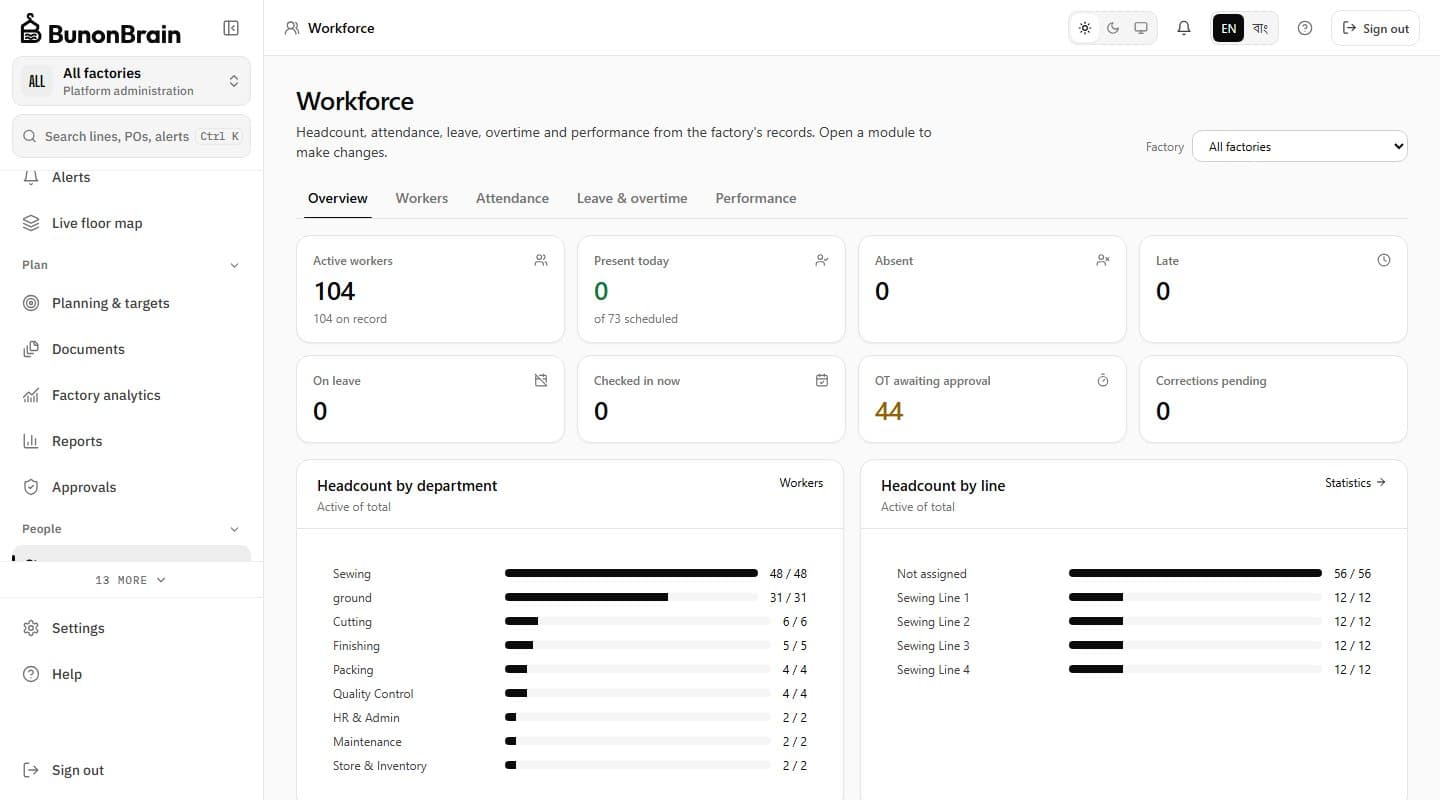
Keep worker profiles in the same system as the lines they work on. Assign people to lines and workstations, link a worker to a login account, and see headcount, attendance, leave, overtime and performance for the factory in one Workforce hub.
The problem it solves
Why this module exists
Worker records, line assignments and skills usually sit in separate registers, so planners cannot see who is available or trained for an operation.
How it works
Workforce Management, step by step
- 01
Profiles
HR and administrators create worker profiles one by one or by import, with employment details visible according to role.
- 02
Assignment
Supervisors and managers assign workers to lines and workstations within their scope, with a full history.
- 03
One hub
The Workforce hub shows headcount by department and line, today's attendance, leave, overtime and performance from the server's records.
Key capabilities
What it does
Worker profiles
Create, import and edit profiles, with employment details visible only to permitted roles.
Workstation assignment
Move workers between lines and workstations in scope; every change is kept.
Account linking
Connect a worker profile to a sign-in account.
Workforce hub
Headcount, attendance today, leave records, overtime requests and workforce analytics together.
Who benefits
HR / Attendance Officer
One directory linked to the production structure.
Supervisors
Know who is assigned to each workstation and who is in today.
Workers
See their own record through a linked account.
Next step
See BunonBrain on a running garment plant
We walk you through the product on a simulated factory and answer questions about your own lines.